
Redlining
The EDGARElectronic Data Gathering, Analysis, and Retrieval (EDGAR), is a SEC system used by public companies to transmit filings of annual and quarterly reports and other disclosures. system has a redlining feature that allows SEC staff to easily identify the changes in an amended EDGAR filing. EDGAR allows you to use the <R> and </R> tags within HTML documents, even though this tagA tag renders a value in XBRL, made up of an element, a calendar, numeric units and a member, if needed. is not supported by common browsers and HTML 3.2. You may want to use this tag set to highlight sections of text for the SEC on an amended filing.
Sections of your submission text that you mark with these redlining tags will be highlighted for SEC staff in bold magenta color in order to differentiate that section of text from other non-redlined sections.
The redline tags within the HTML document are not disseminated to the public. Each redline tag character will be replaced by a blank character (‘ ’) before the submission is disseminated. The blanks will not be visible from the browser but will be visible in the HTML source code.
Apply Redlining
To redline a paragraph or table in your Certent DM Word report:
- Select the entire table or paragraph. To quickly select an entire paragraph, triple-click on a word within it.
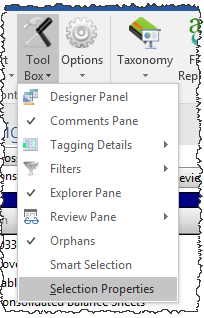
- On the Disclosure Management ribbon, click Tool Box, then Selection Properties. Without a table or paragraph selected, Selection Properties appears grayed out.
- Select Apply Redline Tagging.
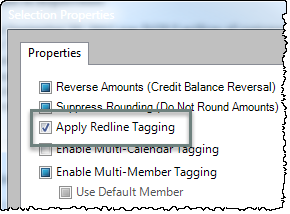
- The redline tag is applied in the report.
Show Me Redline
By default, redline tags are not visible in DM Word surface. In order to view the redlined content:
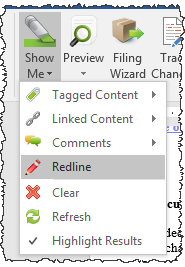
- On the Disclosure Management ribbon, click Show Me > Redline.
- The redlined sections highlight in green.
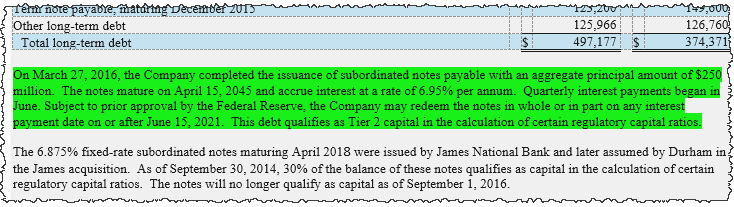
By default, Show Me applies to the report section where your cursor is placed. To apply Show Me to a different report section or the entire report, on the Designer Panel, in the Report Sections tab, first click the report title or one report section.
Error Message
If your selection for redline is not a paragraph or a table, the following error displays:
Certent DM does not support redlining in the selected region.
This error message will also appear when:
- the selection has already been redlined
- the selection spans multiple sections
- columns, rows, or cells are selected, rather than a table
- a word or group of words is selected, rather than a paragraph
red line, red lining
Copyright © 2021 Certent