
Update Fiscal Year End in EDGAR
The fiscal year end must be the same in the EDGARElectronic Data Gathering, Analysis, and Retrieval (EDGAR), is a SEC system used by public companies to transmit filings of annual and quarterly reports and other disclosures. system and your XBRLExtensible Business Reporting Language (XBRL) is an XML-based standard for defining and exchanging business and financial performance information.. If the month/day of your fiscal year end changes, you can update it in the EDGAR system.
Credentials Required
This process requires:
- Central Index Key (CIK)
- CIK Confirmation Code (CCCThe CIK Confirmation Code (CCC) is a case-sensitive code used with the CIK to submit an EDGAR filing. The CCC is eight characters long, with a minimum of one number (0-9) and a minimum of one special character (@, #, &, *).)
- EDGAR Password
Changing the Fiscal Year End in EDGAR
To change the fiscal year end for your company:
- Visit the EDGAR website https://www.edgarfiling.sec.gov/.
- Log in using your company CIK and password.
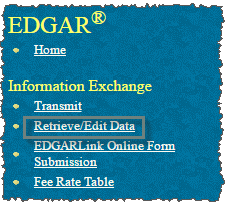
- In the left panel, click Retrieve/Edit Data.
- Log in again using your CIK and CCC, then click Continue.
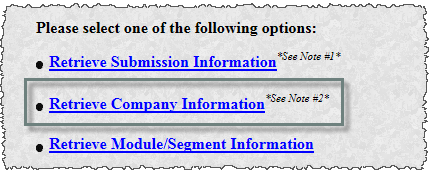
- Click Retrieve Company Information.
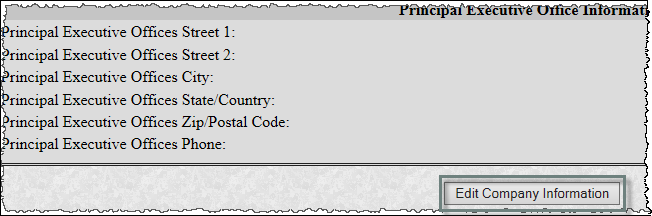
- At the bottom of the page, click Edit Company Information.
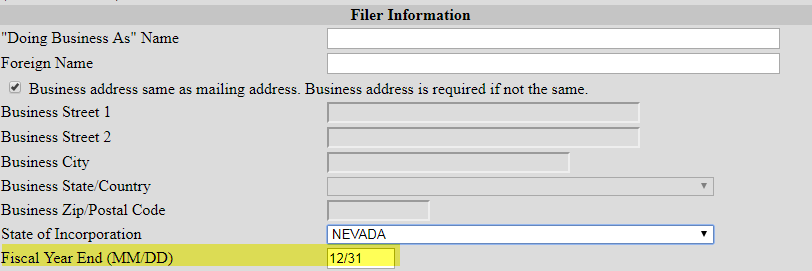
- In the second section of Filer Information, update Fiscal Year End (MM/DD).
- Click Submit Changes.
Availability
The EDGAR site is only available during EDGAR Hours of Operation.
Copyright © 2021 Certent